Ethical tracking in Traqq
Traqq shows work activity data but respects user privacy. It does not take screenshots or collect personal data such as message content or user location.
Traqq is GDPR-compliant and designed to meet data protection standards for transparent and ethical work tracking.
Workspace Owners and Admins can control what work data is collected and adjust these settings based on their team’s needs.
Transparent data approach
Traqq uses a transparent data approach where users can see the same work data as their managers and admins.
Users can view their own:
- Worked hours
- Activity levels
- Idle time
- Apps and websites used during work
Users also see which tracking settings are enabled in their workspace. For example, if “User input activity & idle time” and “Capture names of apps & websites” are enabled, this information is visible in the user profile under the Privacy tab.
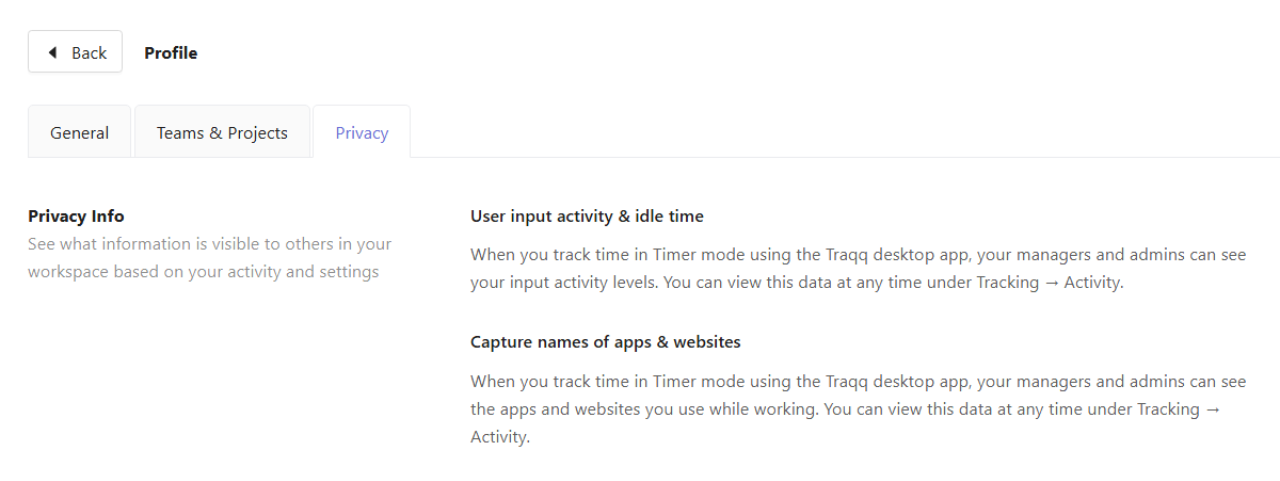
This helps ensure clear visibility of what data is collected and how it is used within the workspace.
What data Traqq collects
By default, Traqq only tracks time spent on tasks and projects when the timer is running. Users can edit or delete time entries if needed, for example if time was tracked by mistake.
Other types of work data are optional and can be enabled in workspace settings or for individual users.
When enabled, Traqq can collect:
Activity and idle time
Shows periods of activity and inactivity during tracked sessions.
Apps and websites
Shows the names of apps and websites used while the timer is running.
Break time
Allows users to log time separately from working hours.
What is never collected
Traqq does NOT collect:
- Screenshots or screen recordings
- Message or email content
- Keystrokes or typed content
- User location data
- Webcam or microphone content
- Personal files or documents
- Content inside apps and websites
Manage tracking settings
Workspace Owners and Admins can control how work data is collected for the entire team.
To configure tracking settings:
Click your profile picture in the top-right corner of the web app and select Workspace settings.
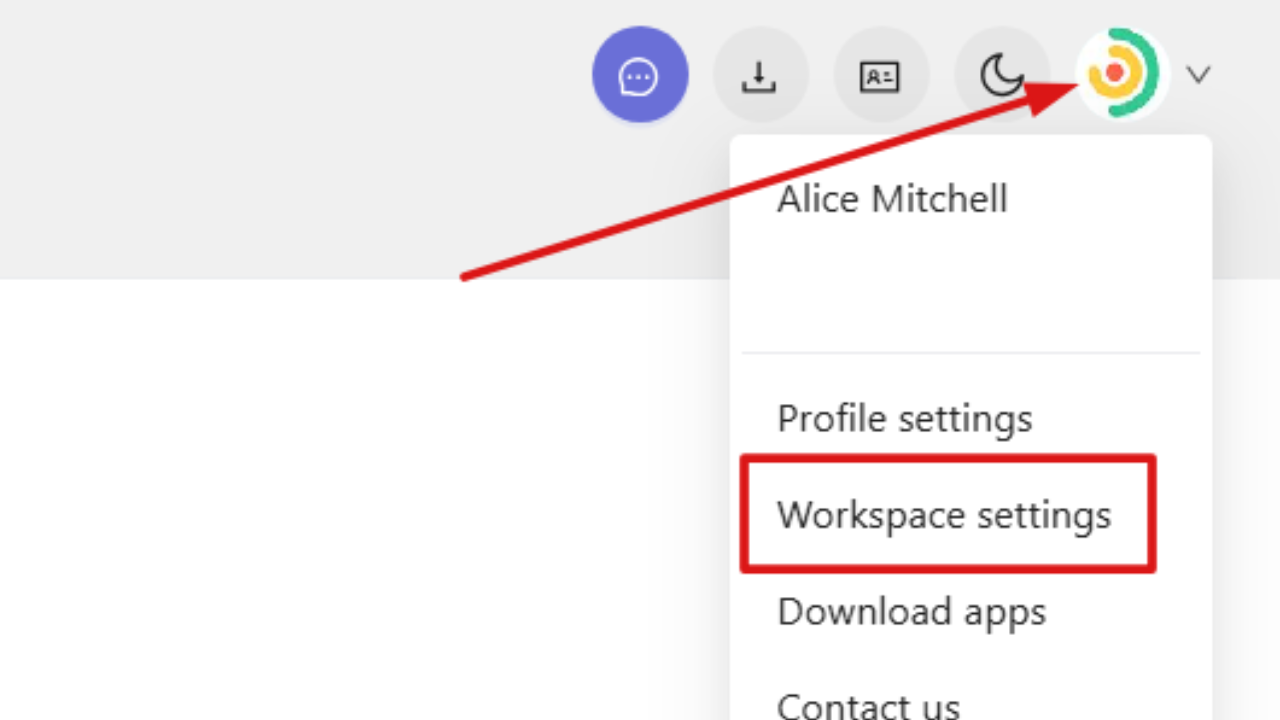
In the new window, open the General tab. In this section, you can enable or disable the following features:
- Tracking mode
- Timesheets
- Expenses
- Default schedules
- Breaks
For more details, see the article on Setting monitoring options in your workspace.
FAQs
Does Traqq collect personal or sensitive data?
No. Traqq does not collect screenshots, screen recordings, message content, keystrokes, user location, webcam or microphone content, or personal files. It only collects work-related activity data.
Is app and website tracking always active in Traqq?
No. App and website tracking only works when it is enabled in workspace settings and when the desktop app is used in Timer mode. It is not active during Break mode.
Can users delete or correct tracked time in Traqq?
Yes. Users can edit or delete tracked time entries if time was logged incorrectly or by mistake. Edited entries are marked with a pencil icon in the time log.