Your workforce can give you a competitive advantage, but it can also grow into your heaviest financial burden.
Data from the U.S. Bureau of Labor Statistics suggests labor costs can gulp as much as 70% of business expenditure. This is a massive investment by any measure. Yet a fair proportion of this spend often produces zero returns.
A mix of operational inefficiencies, such as talent and work mismatches, unoptimized workflows, and idle time, creates a gap between what you pay for and what you actually get.
Effective time-tracking technology counteracts this by identifying, measuring, and eliminating wasted work hours.
This article explores how you can use employee time tracking to reduce labor costs.
Quick Summary
- Your labor costs are the total expenses you incur for the work your employees perform.
- Time-tracking data reduces these costs by helping you eliminate time theft, identify and correct payroll errors, slash administrative overhead, boost productivity, and avoid fines for labor law violations.
- To start cutting costs with time tracking, select an employee monitoring app that fits your workforce’s makeup and can extract the data you need.
- Collect the data over a specific period. One month is recommended.
- Analyze the data to identify cost leaks, such as idle time, payroll errors, talent and work mismatches, and unoptimized processes.
- Provided targeted solutions to the issues flagged after your analysis.
How Can Employee Time Tracking Help Me Reduce Labor Costs?
As a business, you want to make sure that every paid hour contributes to meaningful output. Time tracking makes this possible. It reveals how your employees allocate time, pinpoints payroll leakage, and isolates the tasks or roles driving up your labor costs.
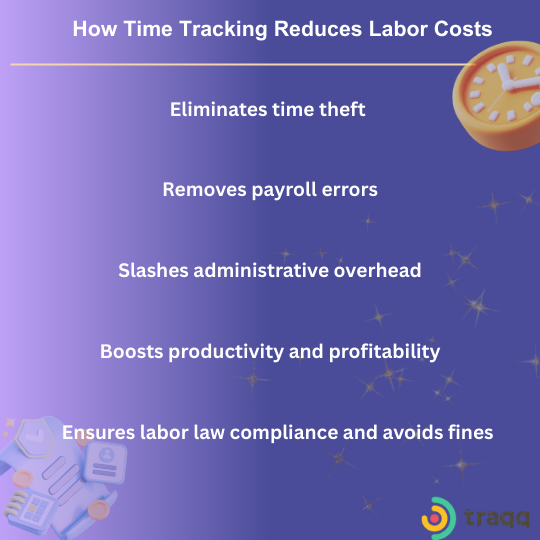
Let’s cover the cost-cutting achievements you can score with the help of time tracking data:
Eliminate time theft
With modern employee time-tracking technology, you only pay for the time that your employees actually spend working. This is important because time theft is a widespread issue in the U.S. and elsewhere, as illustrated in the following statistics:
- Employees ‘steal’ work hours in 95% of American companies
- Companies lose up to 7% of gross payroll to unproductive hours
- A typical American employee inflates work hours by 4.5 hours each week
- Buddy punching (someone cocking in for another person) adds an estimated $373m to American employer obligations each year and affects 75% of companies
Remove payroll errors
Employee time tracking, when combined with invoicing, ensures tighter payroll control. It eliminates the myriad consequences of human error that brands face when using manual systems. An extra hour here or a missed deduction there can quickly morph into cost drains at scale.
A study by EY reports that the average American company makes a payroll error just under 20% of the time and loses an average of $291 to remedy each mistake.
Most of these miscalculations are of the additive rather than subtractive nature, with employees generally receiving additional compensation.
Slash administrative overhead
Manually handling administrative tasks like payroll management and employee supervision can incur labor costs you may overlook.
It can take up to 5 minutes to enter data, plus calculation and auditing for each employee for every pay period. This means that a company with 200 employees could spend approximately 16+ hours on grunt work once it is time to pay workers.
This substantial cost in man-hours can be lessened considerably by automated tracking and payroll systems. Processing time can be sped up by up to 90%, freeing up 156 hours annually.
Boost productivity and profitability
Companies lose up to $1.8 trillion each year due to inefficiencies in the workplace. Employee monitoring shows where these inefficiencies are so you can optimize workflows, reallocate resources, and boost output.
That is why businesses that adopt consistent time management systems report up to 30% productivity gains.
Ensure labor law compliance and avoid fines
There is a compliance component to labor costs, which many businesses take for granted. Under the Fair Labor Standards Act (FLSA), flouting guidelines related to minimum wage, overtime pay and child labor attracts financial penalties.
In the 2024 fiscal year alone, the U.S. Department of Labor’s Wage and Hour Division (WHD) recovered over $273 million in back wages and damages for nearly 152,000 workers. These figures can easily devastate your budget, but time tracking can save the day.
Modern employee monitoring apps provide accurate and tamper-proof time logs for review and auditing. You can use them to verify payment for worked time, including overtime.
5 Steps to Cut Labor Costs Using Employee Time Tracking
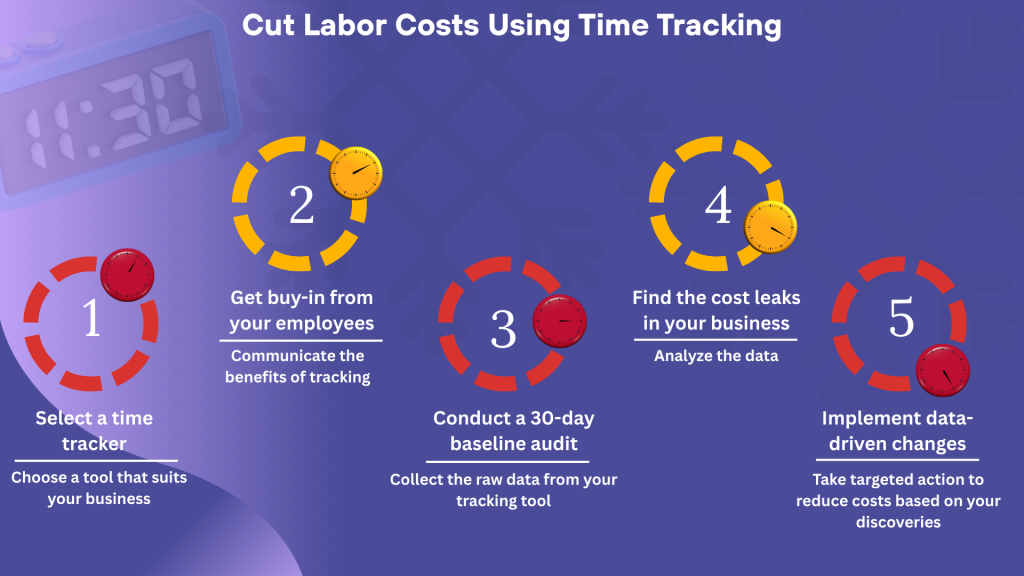
Step 1. Select a time tracker: Match the tool with the workforce
Which app is best for employee time tracking? Many excellent solutions exist, and some will suit your workplace better than others. The best work time tracker for your business depends on your company’s specific needs and the type of activity you need to monitor.
The first step is to define your goals. Why do you need time tracking?
- Businesses that rely on field teams will need time trackers, such as Jibble and Hubstaff, with GPS and geofencing features
- Hybrid and remote teams will benefit from simple trackers that monitor idle time, reduce micromanagement, and provide robust team management controls like time off and overlimit requests and approvals.
The best tools for these needs include Traqq, TimeCamp, and Clockify.
- Teams that need to track productivity to spot time wasters, reduce burnout, and optimize workflow require time trackers with detailed productivity insights and reports.
Applications like Traqq allow managers to assess activity timelines at the team and individual levels. Supervisors and team members can also generate customizable reports.
- Brands that work with clients and intend to measure labor costs against client projects, should ideally go for trackers with project-tracking features.
Remember that the right time-tracking program for designers may be different from time-tracking tools ideal for architects.
Regardless of your industry, ensure you choose a tool that your employees can accept. That leads us to the next step.
Step 2. Get buy-in from your employees
Employee monitoring has always been a sensitive issue for many workers. How do you communicate that you need to track workload hours without sounding like you’re rolling out a surveillance system?
You can allay concerns about time tracking by assuring your workers that privacy is a core attribute of the solution you intend to implement.
You can also frame it as a system that ensures task fairness and financial accuracy for everyone.
Here’s an example:
“We’re implementing time tracking to ensure everyone is paid accurately without infringing on anyone’s rights to privacy. The system will also guarantee that the company stays healthy and competitive.”
A transparent policy brings everyone on the same page. Each person knows what is expected, knows the system is fair and impartial, and knows they will be compensated commensurate with their output.
Formalize the policy in the employee handbook and make it part of onboarding.
What’s the grace period for clock-ins? How should breaks be logged? What happens if someone forgets to punch in or out? How do you address employees not following company policy? Everything should be clearly specified with zero room for disputes or misunderstandings.
Step 3. Conduct a 30-day baseline audit
Before you shake things up, get a clear baseline to know the current state of play.
Set aside a month (it can be more or less) to collect data about how your business currently operates. Your goal is to get a clear picture of the workflow upon which to anchor future decision targets.
Document the following using your time-tracking data:
- Overall work hours: Checking your overall employee workload hours allows you to see a quick difference between actual and expected work hours. Collecting this number should be simple, as most time trackers display total work hours on admin dashboards.
- Time-logged per project: Use your time tracker to collect total time spent on each project, service, or work activity, whether it’s in-house or client-oriented.
Some trackers allow workers to choose which projects they are working on. With other trackers, you can reach this number by checking how much time team members spend on specific applications.
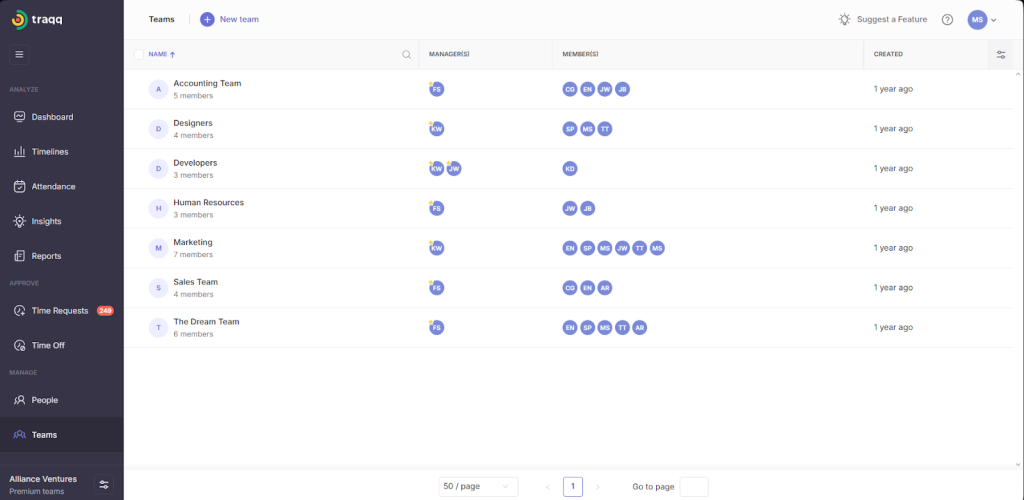
- Time logged per team: Team work hours provide the data required to analyze team performance and assess individual contributions.
You can gather this data by grouping your employees into teams in your time-tracking application. That way, you can see and filter different metrics regarding team work hours.
- Total overtime hours: This metric shows you how many extra hours you’re paying for, so you can determine how much of it is actually needed or can be cut.
It is best to have a time-tracking tool that allows team members to request overtime and supervisors to approve. The tool should also be able to collect data on how much time employees spend during official out-of-work hours, if your company does not require overtime requests.
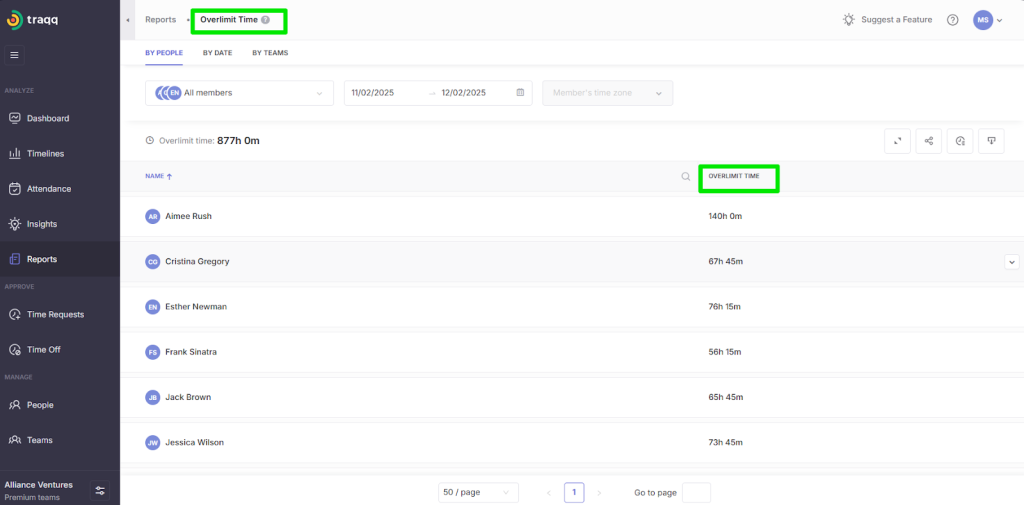
- Billable hours: These are hours spent working for clients. How you approach this number should depend on the type of organization you run. If you’re on a post-paid contract, like how law firms operate, you may need to use this metric to measure how much value you bring to clients.
However, for prepaid contracts where clients pay ahead of time, the fewer billable hours you rack up, the better.
If your organization sells products, like software, rather than services, consider work activities that directly affect your revenue and classify those as billable hours. Examples usually include work hours dedicated to creating and updating the product, Support for paid subscribers, bug fixes, new user onboarding, and new paid feature deployments.
- Administrative overheads: These are also called non-billable hours. They are work hours spent on internal activities, such as internal meetings, human resources, team-bonding, and employee training.
How do you collect this data? Check how much time your workers spend on your meeting platforms, such as Zoom and Teams.
It is best to use a dedicated app for remote and another for regular work communications.
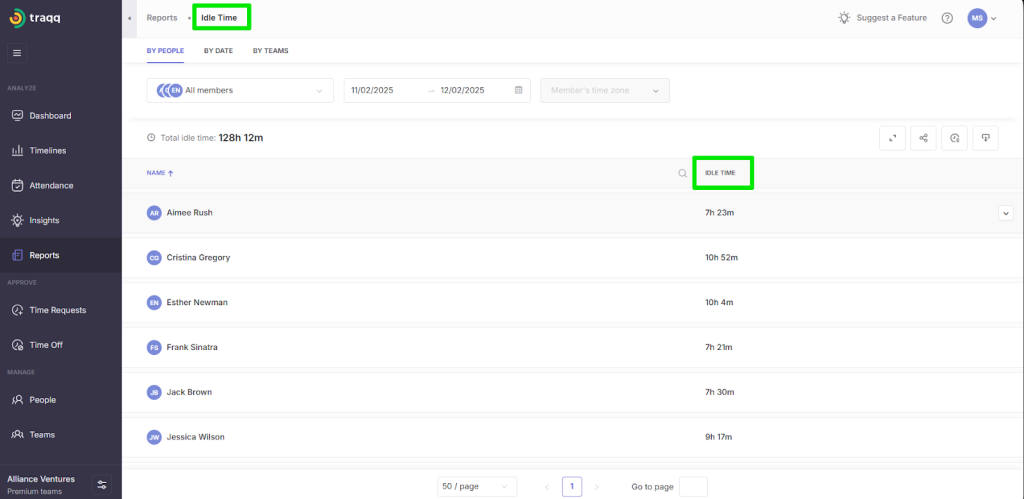
- Idle time: This data point shows when work hours produce zero output. It’s usually not the employee’s fault, as it could be caused by admin and workflow bottlenecks, tool or software downtimes, or lack of work activity.
Employee monitoring applications can spot idle time. For example, Traqq, Clockify, and TimeCamp offer dedicated Idle Time features that allow employers to see when workers are waiting during work hours.
By the end of the test period, you should have all the raw data you need to analyze your labor costs.
Step 4. Find the labor cost leaks in your business now
Now it is time to utilize the real value of employee time tracking. With the data in hand, conduct a thorough analysis to isolate the silent inefficiencies that reduce productivity among your employees.
A good time tracker will easily generate labor summaries, overtime logs, task breakdowns, and similar reports. Query the data.
Payroll inconsistencies and errors
Check how much time your team spends fixing payroll errors. This is fairly easy. Look ut how much time is logged by your HR department and for what specifically.
Compare income vs labor cost
Ideally, the cost of labor should never outstrip or coast close to your income. That’s because when you factor in other operational expenses, your balance sheet will be well in the red.
Your analysis will tell you if you’re spending 30 hours on a client that only pays for 20. That revelation will help you determine whether to optimize task allocation for specific projects and services.
To calculate this difference, subtract how much time you spend per project. This means tracking time spent on specific client services. As mentioned, you need time trackers that allow workers to select projects, in this case.
Compare data at the team level
You may learn that a particular department or team constantly hits overtime thresholds. Why? When does it happen? Does their output justify the extra pay? Question everything.
Doing this might reveal that one department is understaffed while another has too many people. It could also be workflow inefficiencies or poor scheduling. Solving this alone can save the company thousands of dollars per year.
Identify time creep
Time creep is another hidden drain on labor budgets that time-tracking analysis can unearth. From idle work hours to unnecessary work extensions, you can identify factors that expand your paid work hours beyond the norm.
For a company that pays (whole) hourly rates, these minor details can add up to hundreds of unworked but paid hours each month.
Separate unnecessary overhead costs
Another data point is unnecessary admin activities. Internal meetings, emails, and some other forms of communication truly waste time. Reducing them to the barest minimum can free up time for more profitable engagements.
Excessive overtime and weekend work
Some employees will simply work when overtime is available, whether there’s work to justify the extra hours or not. In some cases, overtime is a result of work inefficiencies that leave projects unfinished during regular hours.
The simple equation for calculating overtime is:
Expected work hours – work hours
You need to investigate the type of work being handled during extra hours and determine whether they’re worth the additional pay or should be handled during normal hours.
Step 5. Implement data-driven changes
With analysis complete, take targeted action based on your discoveries. This can take the form of adjusting schedules so workers can produce optimally, refining the workflow for better collaboration, or incorporating technology to speed things up.
| Labor cost issue | Resolution |
| Payroll problems | ➡️Compare scheduled hours, tracked hours, and approved timesheets. ➡️Catch missing logs, rounding, and manual edits that inflate payroll. ➡️Tighten approval workflows, set clear cut-off times, and require accurate daily entries. |
| High labor cost vs income | ➡️Cut down bloat in your work hours to reduce costs and add the savings to your bottom line. ➡️Consider renegotiating terms with the client, but only if you’re charging too low and have fixed inefficiencies that increase work hours. |
| Excessive overtime | ➡️Assess each worker’s or team’s activities during regular hours vs overtime. ➡️Cut unnecessary tasks from regular work hours and optimize workflows to ensure team members spend time on tasks that matter. ➡️If a department doesn’t have enough people, you can reassign workers from elsewhere or hire new ones. ➡️If an employee is slower at completing tasks, earmark them for further training or choose a different person for the tasks. ➡️Set reasonable deadlines. ➡️Enact overtime restrictions to discourage extra work and encourage rest. |
| Inefficient work hour allocations | ➡️Use time reports by role, task, and project to see overloaded and underused team members. ➡️Rebalance workloads, remove duplicated tasks, and assign work to people with the right skills to reduce rework and overtime. |
| Reduced productivity | ➡️Flag work that routinely exceeds estimates and refine its scope. ➡️Ensure briefs are better understood. ➡️Break large tasks into smaller milestones. ➡️Limit distractions for workers. ➡️Use time-tracking apps like Traqq to spot potential burnout and encourage rest. |
| Time creep on projects (work expanding past estimates) | ➡️Pivot to automation wherever possible. Tools like Calendly, email templates, and automated reminders can help the business reclaim hours. ➡️Use trackers with smart tracking functions that can turn off when employees stop working or switch to non-work-related apps or websites. |
More Ways Time Tracking Can Help You Reduce Labor Costs
1. Identify which activities to outsource
One of the fastest ways to reduce labor costs is to stop paying full-time rates for work that external agencies can handle faster and better.
You can use time-tracking tools to identify high-cost employees performing low-value or specialized tasks that are dragging down your margins.
You have to be brutally honest here with your calculations and parameters for determining what to outsource.
These are the tasks you should identify:
- Senior employees doing jobs that require low skills: Outsourcing is recommended if your management-level staff are doing low-level work like data entry, scheduling, or tasks that you can pay less for.
- Low-frequency jobs that require specialization: Your team may need to spend hours learning a tool to execute a one-off project. You should outsource these jobs.
- High-volume projects that will overwhelm your workforce: If you get a high-volume order that your workforce cannot immediately handle, you can break the project into parts and outsource tasks that will be better handled by an external agency without compromising quality.
Example:
Let’s say you run a web design brand with basic SEO services, and a client pays for a full package that includes web design, maintenance, hosting, and a full SEO campaign.
You may need to publish hundreds of high-quality blog articles and create a lot of infographics. This is the kind of work that should be outsourced to prevent employee burnout and ensure quality results.
2. Use time tracking data for labor forecasting
Time tracking data collected over a considerable period transforms into historical data. You learn about the company’s workflow cycles, busy periods, peak times, and down seasons with greater accuracy.
With this historical insight, staff planning becomes easier. You’ll know when you need more people to handle peak demand and when to scale back without compromising service quality.
This prevents the company from hiring more workers than it needs. It also eliminates understaffing, which can be equally costly due to lower employee morale, overworking, and revenue lost to the inability to meet demand.
3. Integrate time tracking with invoicing
Agencies, consultants, and other service businesses earn income from the billable hours and tasks they complete for clients. Integrating time tracking with invoicing ensures smaller assignments don’t go unpaid. It is easy to overlook invoicing a 20-minute revision or a 15-minute call, especially under a manual system.
An integrated time tracker automatically populates an invoice after the service is complete. This can prevent up to a 15% loss of income because workers are bad at filling out timesheets.
Time Tracking Can Save You Money
Many businesses think of time tracking as another expense. In reality, it is an investment with the potential to save you thousands in labor costs.
The right time-tracking technology, deployed well, can pay for itself almost instantly.
It reduces time theft and buddy punching to a minimum, stops payroll errors, and provides a consistent, accurate picture of time and workflow distribution across individual employees, departments, and projects.
Time tracking also incentivizes workers to up their productivity, helps managers to cut down on admin waste, and anchors a better, streamlined and more profitable operation.
FAQs
How can time tracking reduce labor costs without cutting staff?
By helping you cut wasted and unproductive hours, reallocate tasks to the right talent for better performance, reduce overtime pay, choose which activities and projects to outsource, and forecast accurate labor needs.
Which time data should businesses focus on to spot high labor costs?
Businesses should track:
➡️Billable vs non-billable hours for each employee
➡️Idle or unproductive hours (e.g., app inactivity, long breaks, time theft patterns)
➡️Time per task, client, and service
➡️Overtime hours and who is logging themHow does time tracking help control overtime and payroll creep?
Managers can see when team members are close to hitting overtime and can reassign tasks, adjust priorities, or move deadlines before extra hours are logged. Accurate logs also prevent “rounded” or guessed times that inflate payroll.
Over time, time-tracking helps businesses master how to set realistic estimates so projects do not constantly spill into overtime and secretly increase labor costs.
How does time tracking data help fix unprofitable clients or services?
It helps identify which clients accrue more labor costs than they pay for. You can also use time-tracking data to identify services or projects that gulp all your work hours and leave other projects starved of manpower.
Will time tracking break trust and hurt employee morale?
Not if you do it right. Being transparent with employees about the type of data you intend to collect will help you smooth things over. You can show them the admin dashboard so they know what goes on at the backend.
More importantly, assure workers that you’re using a time tracker that respects privacy. One that does not take screenshots or record their screens.
How can time tracking help me decide whether to hire, outsource, or automate?
Detailed time logs show which tasks swallow a lot of hours but don’t require deep expertise. If a task is repetitive and time-heavy, it might be cheaper to automate or outsource it than to keep it on your core team’s plate.