Time tracking calculates how many hours and minutes employees work. Employee surveillance monitors workers, records everything they do, and also measures how many hours and minutes they work.
But people lump time tracking and employee surveillance together because the word “tracking” reminds them of the kind of covert espionage they see in news reports and spy movies.
So once a program collects any data, even non-invasive data like work hours, it is mistaken for a surveillance tool.
The aim of this article is to clear the misunderstanding. To break down what time tracking and employee surveillance are, if and where they overlap, the types of data they collect, and how they record data.
Quick Summary
- Time tracking tells everyone, workers and employers, how many hours employees spent throughout a work period (a day, a month, a year), how long they spent on specific tasks and projects, and how active they were during those hours.
- Employee surveillance, which involves using monitoring tools and apps, involves monitoring everything employees do during work hours, including what shows up on their screens, who they talk to, how they behave, which files they open, and where they are physically located.
- Time trackers, by default, do not collect non-time-related data. When they do, it is because the developer chose to integrate extra features, which won’t qualify as time tracking.
- While employee monitoring tools generally collect more data than time trackers, some are more invasive than others.
- Traqq is an ethical time tracker that only focuses on measuring how long workers spend on work, tasks, projects, websites, and applications without using screenshots, keylogging, and mic and webcam recording to collect data.
Time Tracking vs Employee Monitoring at a Glance
| Key aspect | Time tracking | Employee surveillance |
| Purpose | Records overall work hours and time spent on specific tasks and projects for payroll, future project budgets and billing estimates, and productivity assessments | Monitors employee activity and behavior to ensure security and compliance |
| Technology used | Time-tracking applications, project management tools, timesheets, punch cards, etc. | Advanced software, keyloggers, screen capture, GPS tracking, cameras, etc |
| Operation | Employers can start or stop time trackers or update timesheets themselves | Typically runs without employee input or permission |
| What gets recorded | Clock-in and clock-out times, work sessions, time spent on apps and websites, and project and task durations | Everything possible. They include Keystrokes, screen activity, communication, including webcam feed and audio calls, location, browsing history, file access, app activity, and metadata, among others. |
| Transparency (who sees the data) | Employees are fully aware of what is being tracked and can review time-tracking data | Often covert. Employees don’t know and cannot see what is being recorded. Some employers only partially disclose data to workers |
| Legal standing | Generally accepted and widely used across industries | Subject to strict privacy laws and regulations in many regions |
What is Time Tracking?
Time tracking is a system designed to determine how much time employees spend on work in general or specific projects, tasks, or shifts. It gives organizations a clearer view of how time is allocated across various tasks, but is also used to make pay more accurate.
While today’s time tracking is digitally focused, that is, through software that logs computer-based work hours, employers have used punch cards and manual timesheets to determine work hours.
The core purpose of time tracking
As mentioned, organizations rely on time-tracking systems to determine how long workers have worked during specific periods, calculate pay, and manage tasks. But the data can be applied to other endeavors, such as the following:
- Project costing and billing: Tracked work hours allow organizations to evaluate how much goes into payroll for specific types of projects so they can create budgets that reflect cost realities. It also allows them to set the right fees and billable hour pay that can cover the budget and ensure profit.
- Workload planning: Time tracking apps can help managers determine which workers are overworked and underutilized, which allows them to balance workloads better. Most apps also work with computer time zones and activity levels to determine when workers are most active. That function makes it easier to determine which deadlines work for which team member.
- Productivity and performance reviews: Some workers handle specific tasks faster than others. Time tracking data allows managers to see this. For example, if two employees finish the same tasks two days after assignment, time tracking data shows how many hours or minutes each worker spent on the task.
Time tracking applications also show things like idle hours, activity levels, and work periods to help employers determine efficiency, workers who take longer to produce quality work, and team members who need more support. - Operational visibility into how time is spent: Since time trackers can see how much time workers spend on specific applications, it’s easy to see what takes up the organization’s time the most. This helps identify the most and least profitable projects or clients, as well as areas that need fine-tuning.
What Data Does Time Tracking Collect?
Time tracking primarily records and computes the following metrics:
- Clock-in and clock-out times
- Total hours worked
- Break duration
- Activity duration (or work sessions)
- Time zones
Employers use these data points to evaluate basic work functions and calculate pay. However, depending on the system and the developer’s design choices, developers can program time trackers to use recorded work hours to provide more data.
For most modern time trackers, this involves connecting to a device’s foreground process to determine which apps are running and how long they run. Apps can also view the website name through browser connections so they can report on website sessions.
That function, along with the regular time data, ensures that these time trackers can report the following:
- Activity duration
- App or website usage categories
- Productivity trends over time
- Idle time patterns, where relevant
Time-tracking, by default, does not capture data or use features that people consider a breach of their privacy. These controversial features include screenshots, screen recordings, keystroke logging, webcam recording, microphone captures, and location tracking, among others.
However, some developers may choose to add some of these features to position their trackers as niche products that cater to specific organizations.
How Does Time Tracking Collect Data?
Time trackers measure work hours by sensing how long users spend clicking their mice, tapping their keyboards, using scrollwheels, or engaging their touchscreens. They also connect to the employee system, through local apps, to determine the time zone they’re logging in from and see the names of active (foreground) apps and websites.
It then uses those measured hours and device-provided information to generate data and reports related to app and website usage, daily activity levels, work sessions, and work patterns.
What Is Employee Surveillance About?
Employee monitoring, or surveillance, refers to the practice of observing various employee work activities, such as communication, movements, computer interactions, product handling, behavior, and more.
Companies typically monitor employees this way to measure and boost productivity, track assets, prevent theft or vandalism, safeguard sensitive company data, and improve product quality. But the level of monitoring depends on an organization’s nature of business and what it intends to achieve.
What Kind of Data Does Employee Surveillance Collect?
Employee monitoring apps collect activity, input, visual, communication, and location data. Here are examples:
| Activity | Input | Visual | Communication | Location |
| Browsing history App-by-app monitoring File access logs Search history Printer logs Network traffic External device usage | Keystroke logging Mouse movement and clicks Microphone activity | Webcam feed Screenshots Screen recordings | Emails Private messages Calls, including video calls | GPS tracking IP-based location monitoring Badge swipe records Wi-FI network logs |
The Clearest Differences Between Time Tracking and Surveillance
The following are areas where time tracking and employee surveillance differ:
Purpose
Employers use time-tracking data for payroll, team management, labor cost forecasting, and productivity assessments. Project budgeting and billing estimates are also important uses.
Employers surveil employees to protect sensitive data, ensure workers are not working outside regulations and company policies, reduce the risk of theft, and measure productivity.
Operation
Time tracking requires employees to actively log their time by starting and stopping their computer timers. Once the app is turned off, it stops recording work hours. Clocking in and out at workplaces, using punch cards, or making manual time entries at the end of the day are other time-tracking methods.
Surveillance runs silently in the background without requiring any input or permission from the employee. In some cases, there is no off-switch to prevent the monitoring app from checking up on workers.
What gets recorded
Time tracking data is restricted to time-related insights, such as total work hours for a day, week, month, or quarter, how long workers spend on apps and websites, how long a specific work session lasted, and how active workers were during work sessions and workdays.
Developers may decide to add extra features to time tracking apps that capture other kinds of data, but these are not connected to time tracking.
On the other hand, employee monitoring programs can view employee screens and take screenshots or recordings, capture computer activity like file access, movement, and copying, record conversations, collect webcam feed and microphone inputs, and log mouse and keyboard movement.
Who sees the data
Employee monitoring apps typically transmit employee data straight to the employer and without showing anything to the data subject, even for reviews. Employees may also not know how it is being used. But time trackers show employees and employers the same work insights, and in some cases, workers are allowed to review and approve their calculated work hours.
Legal standing
Time tracking rarely raises legal concerns or barriers beyond standard data protection requirements. Employers can track time in almost every jurisdiction, provided they comply with data protection regulations regarding the time data they collect. But employee surveillance has more complicated regulatory requirements due to the broader range of data it collects. While regulations like the GDPR and HIPAA allow monitoring, companies still risk fines for severe privacy and data breaches.
Where Does Traqq Fall?
Traqq is a time-tracking application. The kind that focuses on time tracking by using regular keyboard, mouse, and touchscreen interactions to calculate work hours, without collecting any user data, whether through screenshots or keyboard logging.
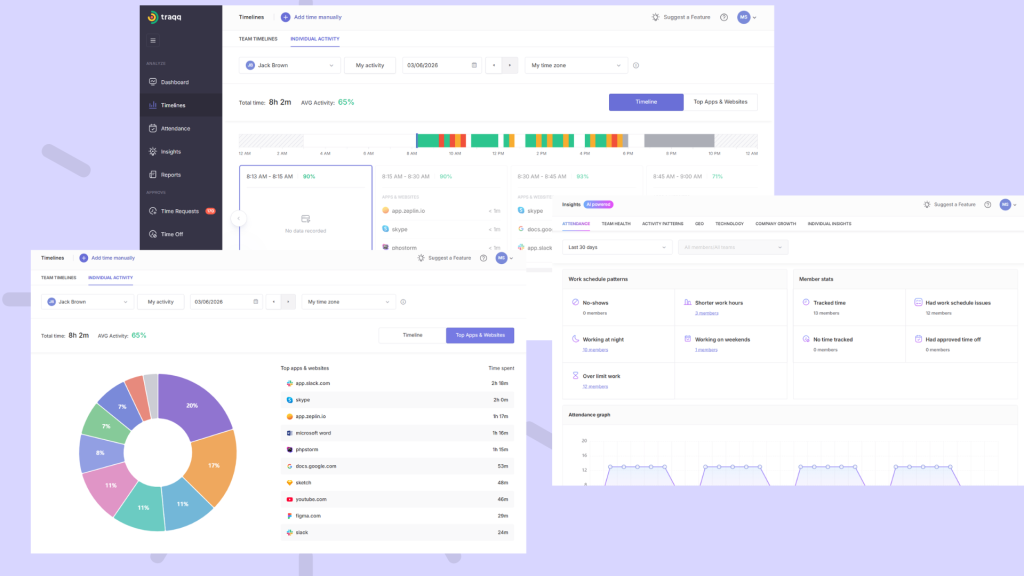
It also allows employers and employees to see the same data, provides export options to both parties for any data set, and supports clock-in and clock-out operations, including user-controlled automatic tracking.