Time tracking policies are one confusing email or enforcement action away from crumbling. Common but avoidable mistakes like sending generic emails to announce time tracking, using monitoring features like screenshots, and tying productivity directly to time data alienate employees and provide misleading data.
Some companies also roll out time tracking in short windows following abrupt announcements. That means workers lack the time to rationalize and prepare for the new work reality.
These mistakes lead to psychological distress, kill productivity, and spark workplace resistance to time tracking.
Quick Summary
- Time tracking implementations fail when an employer’s approach is riddled with mistakes that rub employees the wrong way
- The common mistakes include not consulting employees before introducing the measure, sending company-wide generic introduction emails, not providing detailed explanations about why, how, and when, and refusing to collect and use feedback
- Rolling out time tracking the right way involves telling workers about the plan from the start, collecting and using feedback to refine the policy, allowing ample time for the transition, and showing workers the kind of data the time tracker will collect
- Traqq’s lack of screenshots and data recording, other privacy-first policies, and data transparency model make time tracking an easy sell for employers
Why Remote Rollouts Are Different
Remote workers love remote work because they choose their work hours, switch between different work processes at any time, and are comfortable with measuring success by deliverables. That is why a time tracking policy, even with the best intentions, can seem like a disruption.
Distributed teams also lack the in-person structures that help workers understand and contextualize the change. For example, employees struggling to get what the new work measure is about can stroll to a colleague’s desk for better explanations.
But remote workers usually only have their emails and Google to interpret what the company may be trying to achieve. Workers can also see it differently because a remote work environment is usually a mix of different cultures, where messages can lose meaning because of context.
That is why introducing time tracking in remote workplaces requires a lot of planning around communication and implementation.
The Common Mistakes
The following mistakes cause resistance to time tracking or, even when the policy is accepted, produce unhelpful data:
1. Introducing It Without Explanation or Consent
Receiving policy change announcements with vague explanations about intent and objectives will throw any employee off. Workers will draw their own conclusions in areas where those half-done announcements fail to cover, especially when they are hearing about these policies for the first time.
And when they have to fill that knowledge gap for emails they never expected, it tends to go in the negative direction.
2. Using Surveillance-Heavy Features by Default
Some time-tracking solutions can take screenshots (or record screens), capture keystrokes and mouse input, or record camera and microphone activities. Keeping these monitoring features turned on or using these types of apps at all accelerates distrust faster than almost any other rollout misstep.
Employees will spend less time on their core responsibilities and more work hours censoring the data they suspect they may be giving away. In most cases, it’s for good reason, since they don’t how the company secures sensitive data and don’t want to risk personal information showing up in public.
Those features also trigger psychological stress and reduce productivity. According to the American Psychological Association, 56% of workers who feel monitored report experiencing stress and tension at work.
3. Using Time-Tracking Data to Assess Performance and Productivity
When it’s clear that time tracking data determines productivity and performance levels for employers, workers will dedicate more time and attention to clocking longer hours instead of focusing on actual work.
The result is time data that reflects how workers want to look instead of how they actually work.
Take a worker who enjoys taking notes in a physical notebook. A time tracker will, at best, tag the total time they spend away from their computers as idle hours, a poor reflection on their productivity.
Using time tracking to assess and reward performance without adding context will also look like a way to strip remote workers of their autonomy. This idea also increases distrust in the workplace and makes workers tune out of the organization and set their sights elsewhere.
4. Not Giving Employees Access to Their Own Data
Using time-tracking systems that reserve time records and productivity data for employers sends a message of hidden intentions. Workers will begin to doubt the real reason for time tracking and may wonder what kind of data is being collected.
Employers holding all the data also means workers cannot flag inaccuracies or measure their own work productivity.
5. Setting Unrealistic Logging Expectations
While employers must comply with certain labor laws, such as Sweden’s requirement of 11 consecutive rest hours (which must include midnight to 5), limiting employees’ work windows unreasonably will backfire.
For example, a mandatory 10 a.m. to 6 p.m. work window limits people whose peak work hours have, since before the new policy, always been 7 p.m. to 9 p.m.
Unreasonable logging expectations also come in the form of longer work hours and higher activity levels in trackers.
These are micromanagement measures that never sit well with employees. And as studies have shown, micromanaged workers are the least productive.
What a Better Rollout Looks Like
A better rollout convinces employees to embrace time tracking and focuses on improving working conditions.
That requires:
- Explaining the policy and its intentions in the clearest of terms
- Carrying employees along from the initiation stage
- Applying employee feedback to the policy
- Providing employees with access to their data
- Using time trackers that match the employer’s stated goals
- Not using time data as the sole productivity indicator
On the subject of time trackers, deploying tools without monitoring features like screenshots, especially when the company does not need monitoring, can ease employee concerns.
Employers also have to be wary about the level of autonomy they’re stripping away to avoid any appearance of micromanagement. Older work routines should be maintained as much as possible.
Additionally, rolling out the time-tracking solution and the policy that accompanies it in stages will allow employees and employers enough time to understand and assess the finer details, share feedback, and fine-tune the policy.
How Does Traqq Handle Time Tracking Implementation?
Traqq uses keyboard, mouse, and touchscreen interactions to measure work hours, without taking screenshots, recording keystrokes or mouse inputs, or capturing microphone or webcam activity.
The model makes messaging more straightforward and effective, since the app focuses on using only time data, which it shows employees, to produce work insights.
These insights, which are identical on both employer and employee dashboards, include app and website usage, burnout prediction, overwork reports, peak activity days and sessions, and idle hours, among others.
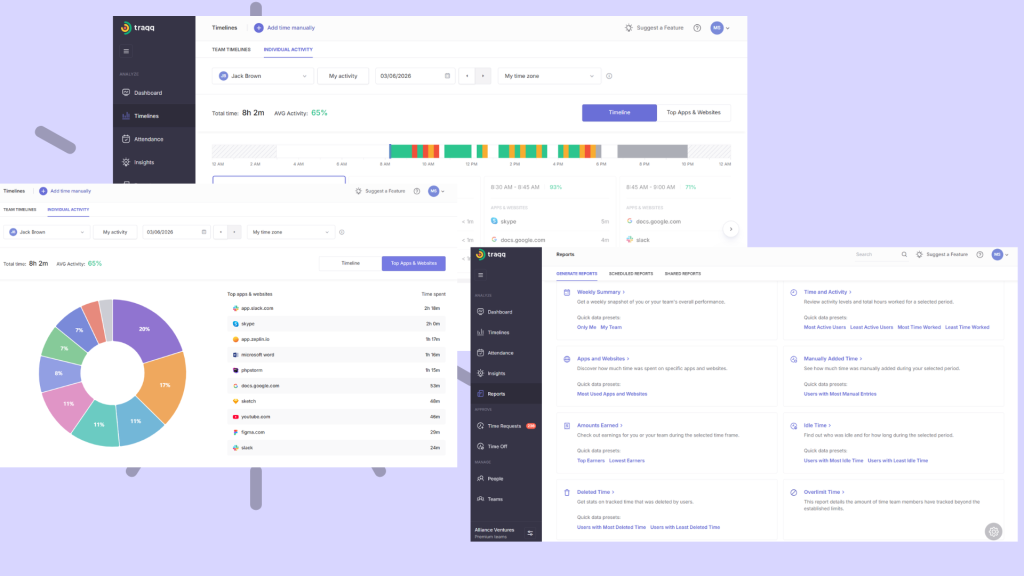
Alongside those reports, employers can communicate controls like tracking restrictions and overtime approvals as measures that improve team health because they help with preventing burnout and balancing workloads. The manual time addition feature also allays fears of off-device work going unnoticed or unrewarded.
Conclusion
Employers botch time tracking measures by miscommunicating and implementing policies that don’t align with the concept of remote work. Using applications that can capture sensitive data, even when they can be turned off, implementing high-handed policies, such as setting unrealistic logging expectations, and tying productivity to logged hours, are also mistakes that can derail any measure to record work time.