Time tracking shows managers of freelance teams, especially globally distributed ones, how much time team members spend on specific tasks without the check-ins freelancers find annoying. This visibility into work hours makes it easier to measure productivity, accurately calculate billing, draw up reasonable future project estimates, balance workloads, and ensure accountability.
Quick Summary
- Time tracking for remote freelance teams calculates work hours to show how long workers take to complete tasks, which days they worked and were absent, and how much time they spend on apps and websites.
- These work hour calculations ensure accurate billing, transparent work feedback and task management, productivity measurement, better workload balance, and reasonable project forecasts.
- Some freelancers may struggle with using time trackers because their devices may not support a client’s tool or their non-digital work processes may not be accurately captured
- Time tracking may also force workers to assume unnatural work postures, such as tapping away at keyboards to look busy, which may hurt productivity and diminish trust.
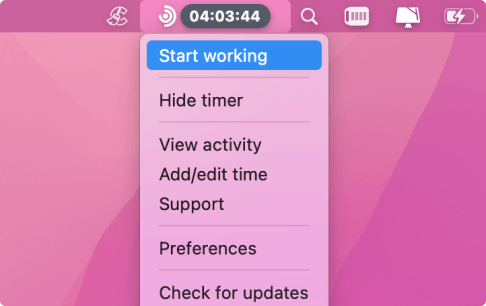
- Traqq provides time tracking data by observing mouse and keyboard activity without collecting screenshots or input data. It also allows workers to set smart tracking parameters that automatically turn the tracker on or off, depending on the current website or app or how long the tracker stays inactive
What Freelancer Management Looks Like
Handling a team of freelancers involves working with remote contractors across different time zones who treat employers as clients. Unlike in-house teams, there are no shared schedules or workspaces, workers use personal devices, there may be language barriers, and communication is not instant.
That means managers also lack the built-in visibility that official devices and shared workspaces and calendars provide.
Because of this remote structure and the lack of visibility, deliverables and invoices become the primary work record. Deliverables show that workers have completed their tasks, and invoices represent the cost for those completed tasks. They cannot help managers determine how much time went into iteration, rework, research, and other middle processes.
Additional tasks that accrue extra costs, also called scope creep, can also happen because supervisors lack real-time visibility into different work stages. This may lead to billing disputes because a manager’s informal nod to do something may be mistaken for approval to start separate billable tasks.
What Are the Benefits of Time Tracking for Managers of Freelance Teams?
Time tracking allows managers to avoid billing issues, produce more accurate project forecasts and budgets, prevent scope creep, ensure accountability without micromanaging freelancers, and optimize workloads.
Here’s a breakdown:
Billing accuracy
Since time tracking calculates total work hours, there will be little to no room for billing disputes because freelancers will be paid according to the reported hours. The level of precision the system offers also ensures that workers are paid for every minute, including any extra minutes, as agreed.
The kind of human errors that cause paycheck reviews and corrections will also reduce because most time-tracking tools can generate invoices at the tap of a button.
Budget control
Requiring freelancers to log work hours, especially against specific tasks and projects, allows managers to see each project’s costs in real time. That way, they can course-correct mid-project by narrowing the scope of work or securing additional funding, instead of getting surprised by an overblown budget at the end of the billing cycle.
Accountability without micromanagement and monitoring
One of the hardest balances to strike in management is keeping freelancers accountable without hovering over their shoulders. Time tracking provides the kind of oversight that respects the freelancer’s autonomy because managers can check their dashboards to see work progress without sending status update emails every hour.
Freelancers don’t have to feel watched either, since many time trackers only show that workers are active and spending time on specific apps and websites. These privacy-respecting tools won’t collect personal information or record screen content.
Assessing productivity
By showing how long workers spend on tasks and projects, time tracking helps managers identify people who take less time to produce the same required work quality. The data also highlights the type of work that each freelancer excels at. That means managers can step in to reassign work to the most efficient hands available to improve project completion rates.
Balancing workloads and preventing burnout
Since time tracking shows total worked hours, it’s easier for managers to tell when some freelancers are overworked or underutilized. That way, they can move tasks around to ensure workers are not overwhelmed, and at the same time, ensure the right workers get the right jobs.
This fair task distribution helps improve overall team health, retain talent, and boost productivity.
Managing work across time zones
Coordinating workers across different time zones is one of the most challenging aspects of managing freelance teams because everyone relies on delayed communication.
But that asynchronous communication, where workers respond when it suits their work schedule, poses less of a work issue with time tracking. Managers can look at their dashboards anytime to review recorded work insights instead of waiting past their own bedtime for check-ins and updates.
Also, it allows supervisors to plan tasks suitable for these time zones and set the right deadlines for smaller tasks and bigger projects.
Better scope control management
Managers need real-time work insights to predict and manage scope creep, the situation where a project grows beyond the original plan and becomes more expensive and time-consuming.
Looking at recorded time tracking data helps to identify when additional requests and extra tasks start making the work bigger than it should be. And since some project expansions are legitimate, conversations with stakeholders, backed with real numbers, about adjusting the budget and deadline or sticking to the original blueprint can happen earlier.
More reliable project forecasting and delivery planning
Insights about each freelancer’s work efficiency and the team’s overall speed in past projects can help managers determine how long the next project will likely run. That way, creating accurate budgets and strategies for future projects will be easier.
This advantage also spills into billing and product pricing. If the team works for a client, the company can set its fees right. If the efforts go toward creating products, say software programs, the brand can choose ideal prices to stay competitive and boost its bottom line.
Why Time Tracking May Create Problems
With all its benefits, time tracking may still cause the following issues:
Time tracking may look like monitoring
While many time trackers respect employee privacy, the idea of a computer program recording work hours doesn’t sit well with some freelancers. This feeling makes workers trust employers or clients less and keeps them looking over their shoulders.
It also doesn’t help that some time-tracking applications take screenshots and may collect sensitive personal data.
Time tracking chains people to their screens and may cause distractions
Time trackers make workers feel like they must always stay at their desk if they want to get paid. Since the program only exists on their computers (a few trackers have mobile versions), any time they spend working off-screen feels like lost money.
Also, knowing that a tracker is always active in the background means workers have to be conscious of the apps they open to avoid violating policy.
Not every work process may be calculated
As mentioned, trackers only calculate work hours on supported digital devices. Freelancers who may need to work without their devices have to go through manual processes to convince managers about those offline work hours.
Conflicts may happen
Freelancers mostly work with personal devices and for multiple clients. Installing a client’s time tracker takes task switching between multiple projects off the table. That’s because the tracker may record another client’s work hours.
What Do Alternatives to Time Tracking Look Like?
Managers who want to skip the downsides of time tracking have to take up the following, often more challenging, options:
Fixed fee contracts
Freelancers and clients agree on a total price for specific deliverables upfront. These deliverables can be clearly defined project milestones, the number of submitted tasks, or fully completed projects.
Freelancers enjoy this structure because the pay is predictable and tied to results, and they have freedom to control their work process.
However, scope creep may affect work quality and delivery. When the project’s demands begin to expand, and more work is required to maintain quality, the freelancer may take shortcuts to protect their profit since contract fees are fixed.
Manual check-ins
With this arrangement, managers track work progress by creating check-in schedules with freelancers to receive updates. It provides a little more detail than looking at time-tracking charts because managers can hear directly from freelancers about current hurdles or required changes.
Despite the advantages, freelancers, and even employees, see manual check-ins as notorious time wasters. These check-ins can also easily devolve into micromanagement because managers may want to run announced quick follow-ups or point out additional findings.
Daily or written status updates
Requiring freelancers to send written daily or weekly status reports allows managers to stay in touch with work progress without disrupting workflow. However, the process may not be as efficient as a neutral tool since it depends on the freelancer’s subjective memory. Workers may polish reports to hide delays or rush through the process without the breakdowns needed to truly weigh process performance.
Task tracking in project management tools
Project management tools allow freelancers to update the status of different tasks and projects, provide context, and automatically move the workflow along. But what they lack includes details such as how much time a person spends on a task, their active and idle work hours, and website and app usage.
How Traqq Works For Freelancer Management
Traqq uses mouse and keyboard interactions to measure active and idle hours, but does not collect screenshots or record any input data. It displays every team member’s total work hours and activity levels on the manager’s dashboard.
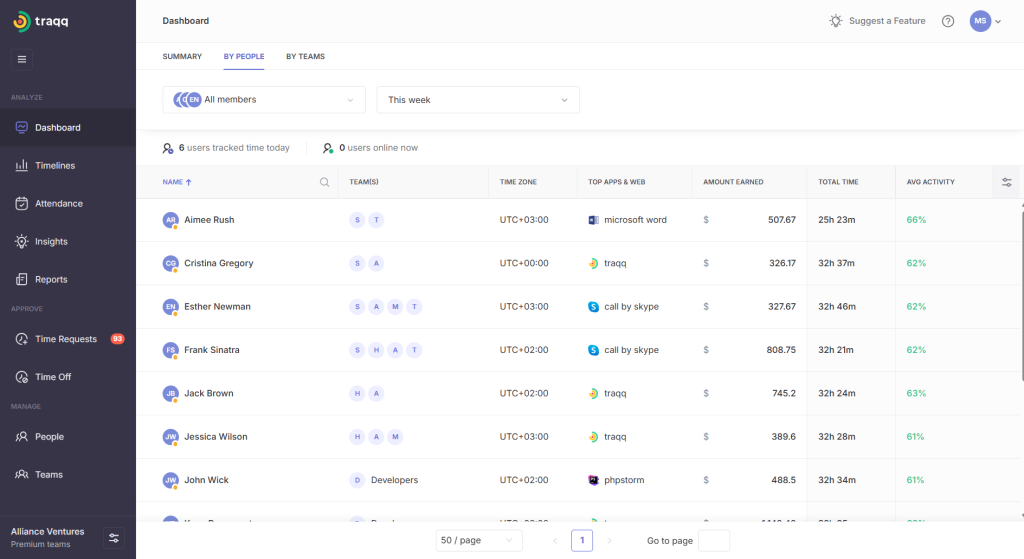
Managers can go on to view individual work metrics, including website and app usage, color-coded activity levels, and adjustable (weekly, daily, and monthly) reports. It also helps managers to:
- Identify potential burnout and restrict work hours to prevent it
- Monitor weekend work
- Spot underutilized workers
- Manually add or subtract time
- Approve and track time off requests
The desktop app allows freelancers to set automatic controls that turn the tracker on or off, depending on the active website or application. That way, they don’t have to worry about task switching and using personal time for work.
Conclusion
Time tracking is good for freelance team management because it provides detailed, ongoing work progress data without making workers feel micromanaged or monitored. The data allows managers to identify problems early, accurately measure productivity issues, avoid scope creep, and create better project forecasts and budgets.